https://www.beedesign.no/Games/Goldroidsv0.2.6/
Update 26.07.2018
The only visual change in version 0.2.6 is a new visual
representation of the Goldmining Spaceship, it's stages and levels, on
the (new) bottom menu. Consist of 2 animated pictures, one 82 frame
gradient animation of the current stage (that one was a bastard to
pixellate) and one 37 frame animation of the spaceship and it's
current/completed levels highlighted (this one wasn't too bad - a few
lines to change colour each frame).
I use a few Global Variables to select the correct frames of the animations at the initialization of each level.
The events/actions was very easy to implement, but the pixelling was very - shall we say - tedious... 4 hours well spent?
Oh, and made the game touch friendly for testing...
Just to reiterate: Space/Tap to start, Enter/Tap to proceed to
next level, Arrow Keys/WASD + Space to control Player/Shooting and Esc
will return to Start.
Quite a few updates on Goldroids these days and I'm continuely
uploading new test versions online. I'll try and update this post with a
link to the current version and a add a few notes for each version...
And who knows, maybe one day it's actually possible to play this game :)

If it's not 8-bit, there's no point.
Saturday, July 21, 2018
Wednesday, July 18, 2018
Part 5: Goldroids - Diary of a Game
In my last update I talked a little about progress. My (cunning)
plan to restart - and restructure - the project was a brilliant plan at
the time, but unfortunately I got a bit tired of Game Design and got
into reading and writing instead. Now a year and a half has passed and
it's about time to pick up where I left off.
First of all I had to pull out my last saved version of the Goldroids project files. I had reinstalled Parallels Desktop a few times since last session, so I started digging through my iCloud Backup drive to retrieve the files. Apparently, I never backed up my latest version of Goldroids, so a lot of the changes I'd done after my restart, was gone - forever. In the end, I did find a backup of the first version after the restart, but unfortunately a lot of the changes I'd incorporated was missing.
A few evening sessions later and I was finally ready to start where I left off. More or less. The only thing "remaining" was to get a quick overview of what changes I had originally planned for the second phase of this project. After some brainstorming, and discovering these old Diary of a Game posts, I was good to go. The main areas of change was as follows:
In the end I want each Level Layout to only contain the tilemap for that specific level. Everything else will be initialized/set up in the different include files attached to each Layout. So much easier to do changes in events/actions this way.
I've completed all the changes so far in the project, but there will be a lot more to come, trying to get my head around everything. (Probably the main reason for this post in the Game Diary)
Quick test of the new Level Structure below... PS! The lack of playability is not a bug, rather a feature, in this version... Jump through the levels by hitting ENTER :)
https://www.beedesign.no/Games/Goldroidsv0.2.4/
While brainstorming the above changes, I got bored and got out some pen and paper. The jury is still out on wheter or not this will be a beedesign or an Absence of Mind Production, so I did a few quick doodles for both options. To be re-done in Photoshop next time I get bored. Colours/Gradients, etc is not finalized yet - by a long shot. I only had a pencil and a blue/red pen available at the time.
PS! I also made a complete sprite font of the "PRESS SPACE TO PLAY" text on the Startscreen. I figured it will possibly save some space and I will have more options using the same font in other menues/dialog boxes (without having to draw a logo in Photoshop every time needed)


I recently read Steve Turner's Graftgold blog where he talked a bit about planning your code and using old school Pseudo coding... So, I decided to follow the master and have a go myself. Excuse my handwriting, it was done during a 10 minute toilet break - I am at work these days, after all :)

First of all I had to pull out my last saved version of the Goldroids project files. I had reinstalled Parallels Desktop a few times since last session, so I started digging through my iCloud Backup drive to retrieve the files. Apparently, I never backed up my latest version of Goldroids, so a lot of the changes I'd done after my restart, was gone - forever. In the end, I did find a backup of the first version after the restart, but unfortunately a lot of the changes I'd incorporated was missing.
A few evening sessions later and I was finally ready to start where I left off. More or less. The only thing "remaining" was to get a quick overview of what changes I had originally planned for the second phase of this project. After some brainstorming, and discovering these old Diary of a Game posts, I was good to go. The main areas of change was as follows:
Game Restructuring/Use of Include files
Right now (previous version of Goldroids) I set up and initialized everything in the Level Layout. This is fine if you only have one level, but once you add another 35 levels (the current plan) and needs to go back and change one little thing, you'd end up changing the same thing in all of the 36 Level Layouts. So, I'm setting up several Include files which will control certain events/actions/set ups/initialization, etc. These will then be included in the Level Layouts as required.In the end I want each Level Layout to only contain the tilemap for that specific level. Everything else will be initialized/set up in the different include files attached to each Layout. So much easier to do changes in events/actions this way.
I've completed all the changes so far in the project, but there will be a lot more to come, trying to get my head around everything. (Probably the main reason for this post in the Game Diary)
Game Control Variables
Similar as previous area, I will probably have all the Global Variables in one Include file for easy access when developing, and not having to set them up in each Level Layout as before.Game Concept
Funny how things - and plans - change over time, specially while you're developing something. Originally I planned for Goldroids to be set inside a gold mine in a huge mountain, but the player/enemy sprites I made - alien UFO's - didn't really fit in this environment. So Goldroids is now set in space. On board a huge mining space ship. Your mission is to steal as much gold as possible whilst fighting off the space ships security Droids. You pick up gold while manouvering the different levels and you'll get an extra change for a huge loot in the Boss level between every section of the Space Ship. There will also - eventually - be a boss Droid to kill in order to proceed to the next section.Level Structure/Design
The big question is how many levelsI should have in this game? Hard to put down an exact number, but I think I came up with a cunning sollution. The Mining Space Ship will be divided in sections. 6 should do. These will have different colour schemes and the difficulty will be slightly harder for each section. Each section contains 5 levels with a special Boss level in the end that needs to be beaten in order to proceed to next section. It looks like I will end up with (6 x 5) + 6 = 36 levels. The only thing I haven't decided on yet is if the last Boss Level will be a special "escape" level.Quick test of the new Level Structure below... PS! The lack of playability is not a bug, rather a feature, in this version... Jump through the levels by hitting ENTER :)
https://www.beedesign.no/Games/Goldroidsv0.2.4/
While brainstorming the above changes, I got bored and got out some pen and paper. The jury is still out on wheter or not this will be a beedesign or an Absence of Mind Production, so I did a few quick doodles for both options. To be re-done in Photoshop next time I get bored. Colours/Gradients, etc is not finalized yet - by a long shot. I only had a pencil and a blue/red pen available at the time.
PS! I also made a complete sprite font of the "PRESS SPACE TO PLAY" text on the Startscreen. I figured it will possibly save some space and I will have more options using the same font in other menues/dialog boxes (without having to draw a logo in Photoshop every time needed)


I recently read Steve Turner's Graftgold blog where he talked a bit about planning your code and using old school Pseudo coding... So, I decided to follow the master and have a go myself. Excuse my handwriting, it was done during a 10 minute toilet break - I am at work these days, after all :)

Sunday, January 15, 2017
Part 4: Goldroids - Diary of a Game
Before we start, a small digression and an update to my last post on http://www.beedesign.no/construct2-vs-gamemakerstudio-2.
For the time being - and probably for good - I've stopped playing around with GameMaker: Studio 2. At the end of the day, the price just killed it for me. So, when Construct 2 went on sale during the holidays, I went ahead and got myself a license (30% discount).
I know it's a Windows only program, and I did have major problems running it in a VM environment previously, but after some testing, I found out the problem wasn't Construct 2 at all, rather a bug in VMWare Fusion. I am currently running Construct 2 in Parallels Desktop with no problems what-so-ever, other than the fact that my tired, old faithful MBA is experiencing some sluggishness now and then... As expected.
Back to the subject matter. Progress? What is progress really? Is it progress to take a few steps back when it eventually will make progress? Personally, obviously, I would think so. Hence, I started Goldroids with blank sheets. I will reuse most of the code I've already done, but I found the project needed a bit more structure to be able to progress further. I needed a more flexible setup of the code, really. Right now I was creating all events and actions in one "Level" layout, which is fine as long as you only have one level to think about. But - "unfortunately" - I'm opting for a dozen (or so) levels (at least). Imagining if I decided to change something towards the end of the project. With my original setup, I'd have to change the same events in each layout (for every damn level) to make one change. This is not a good way to work. Trust me, I've struggled with this in multiple previously (unreleased) projects.
So I decided to look into include files. I'm planning (and doing) to make separate event sheets for blocks of events that will be used in each level. The "Level" layout will more or less only be a visual "set up" of the level and I'll include the different event sheets needed to make the Level work. This way, if I need to fix something, I will fix it in the include file and it will be reflected in every layout where this include file is used.
I also had a major fight with the player animation. This turned out to be the most "advanced" piece of code I've done in Construct 2 so far. Not going into too much details (ref. screenshot below), I wanted to have a directional based animation (not flipping the sprite, rather reversing the animation when needed) based on the player's movements. I really had to think hard about this one, and luckily I found some good advice along the way in Scirra's Forums. Thanks a bunch! It turned out the trickiest part of this was to crack the repeat-to-frame part of the actions. And also deciding which animation to be more dominant (when moving). A 50-50 multiplier just never looked right. Making the horizontal animation more dominant looked - and felt - much better.

So, right now, visually, it looks like I'm way behind on progress - there is only a menu and the player on screen - but I believe in the long run, these were the correct actions to take.
I almost forgot, I did a major redesign of the background tiles. Seing as a level can have several different background colours, it was really an idiotic way I started designing my tile maps. Previously, I had 8 different tile maps for each level. They were really identical, only the background colour was different. I now have 1 tile map for the walls, 1 tiled background for the floor (same for ALL levels) and changing the background colour based on variables in-game. This means, for each level I have to design, I only need to design the walls (once). This makes everything much easier. Imagining designing 8 tile maps for each levels. What WAS I thinking... hehehe Well, you learn from your "mistakes", I suppose.
Another thing I'm looking (vigorously) into at the moment is the game flow. I'm planning to have Global and Instance Variables controlling everything, not just jump from one level to the next. It needs to be flexible as the player can choose whatever level he wants in the mining map (eventually). Although I believe I have most under control (in my head), at some point I need to implement this in the project. And "sooner, rather than later" springs to mind on this one :) I've controlled the game flow like this in previous (unreleased) projects, but I'm sure it needs some fine tuning to work "flawlessly". After all, if I get this right, now, I will be able to reuse this method in other projects down the road.

For the time being, the "new" Goldroids project can be tested at the following link:
http://beedesign.no/Games/GoldroidsNew/
In this version you can turn music on/off by pressing 'M' on the Startup Screen (for now), except in Safari, as there apparently are some issues there. Note: The "tune" is a 5 minute effort in Lmms just to check out some C64 arpeggios I found in the "Commodore 64 Synthesizer Sessions DELUXE" package. I recommend trying out the game in Safari to make sure you don't get to hear the music ;)
You can also press '1-4' for different background colours, 'X' for player invisibility and 'ESC' to return to the Startup Screen.
Note: In Goldroids, the player has to move in order to be able to shoot. This is by design, not by accident. Honestly!
The old version of Goldroids can be found on the following link:
http://beedesign.no/Games/Goldroids/
There are several keys you can press in this version as well, but, honestly, I forgot them all...
Wednesday, November 16, 2016
Construct2 vs GameMaker:Studio 2
What the hell, Construct 2...
Let me first make it clear that I'm not writing this because I'm struggling with the progress of my current Goldroids project, far from it. I was doing great for a while there. Graphics was pouring out of my finger tips. Start screen/Level/MiniGame were all starting to come together. And then, Construct 2 decided to go "all lights out" on me. WTF?? Every layout I try to view/open in the editor is just... Black... If I click around inside the black area, I can see the properties for the different objects change in the properties window on the left hand side of the screen, so everything IS there... But I can't really DO anything... The event windows shows up as they should, but I'm really stuck until I can actually see what the hell I'm doing... See picture below...
I actually have run into this issue once or twice before, but either very early in a project, so I've just created a new project to continue, or - by some "magic" - the bug has disappeared after a while.
This time I'm 3-4 weeks looking at a black layout, and no matter what I do, the issue won't go away...
Choices
So, what to do... I have most of the graphics I need for Goldroids ready, I really just need access to the Game Editor to continue...Bang, YoYoGames hits us with a beta of GameMaker: Studio 2... My "I-Need-To-Test-This" OCD goes into overdrive - since I'm still awaiting the beta/alpha of Spark (for a year now...) - and I manage to get a spot in the beta period (open to all now).
I did try the legacy GameMaker: Studio previously, but I didn't like it - it just looked strange - so I gave up on that one. At first glance, GM:S 2 looks way better. So I decide to take it for a test drive.
It's actually very easy to use - once you get into it. I've even done some (easy) GML programming in the test version of Goldroids I'm currently playing with. I really don't like coding - at all - (being a oldschool Graphician, and all) but GML is really easy enough that even I understand it. See picture below...
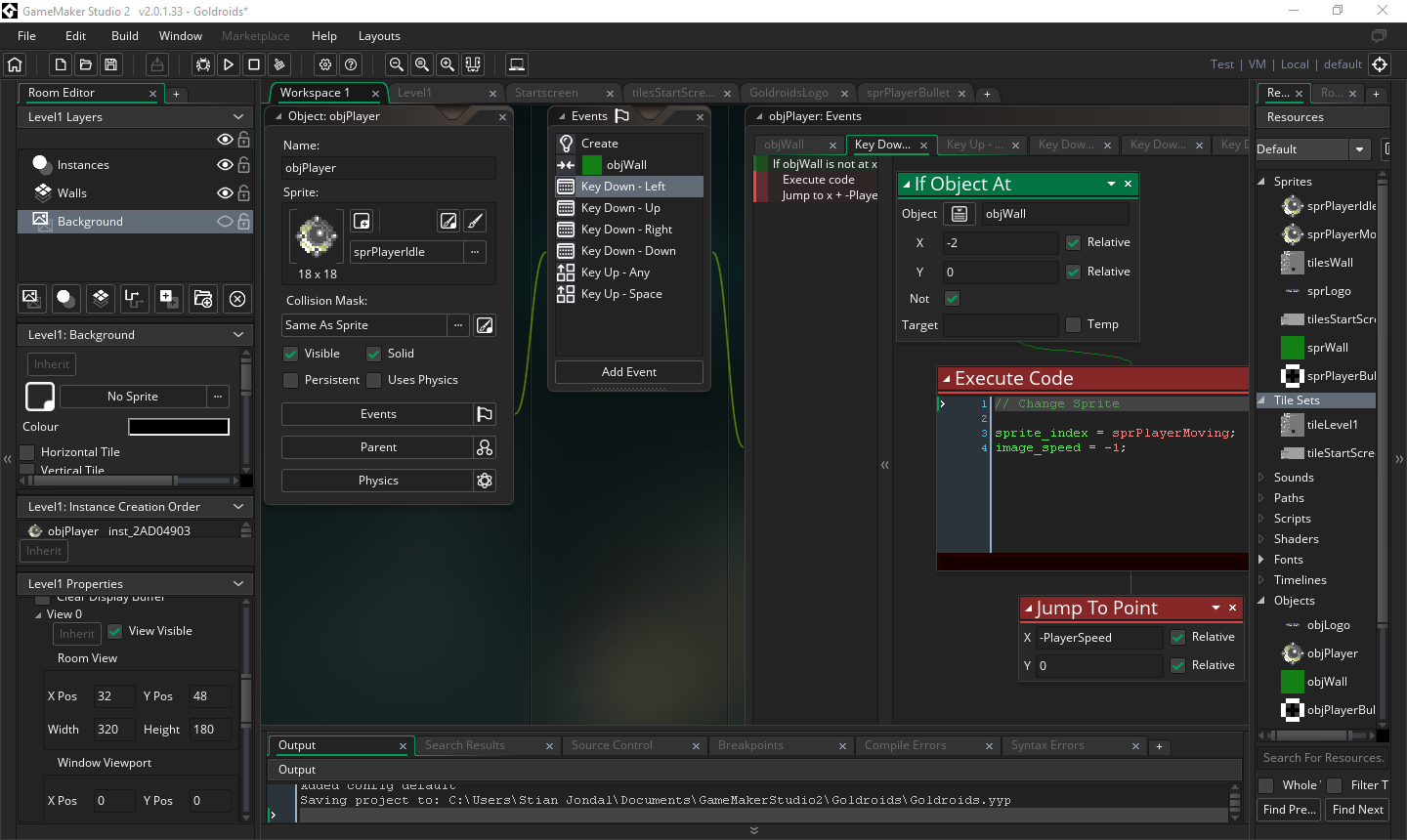
Now, will I continue to use Game Maker: Studio 2? That's the big question. There are so many things I like about it. Easy to use, sprite/animation editor, tile editor, Drag and Drop and GML programming - or both at the same time.
Well, there are a few issues - as always. Seing it's only a beta, there are several limitations at the moment, and you are not able to make anything executable. I don't like the fact that you can't assign collision polygons to individual tiles in the tile map. You end up using invisible walls for collision detection all over the place. Yes, I believe there are ways to do this in GML, but then we're talking waaaay above my level of understanding :)
The biggest let down is really the price. Not having a license for legacy GM:S, I don't get the 40% discount for an upgrade, and you need to buy several modules depending on which platform you plan to work with. We're talking hundreds and hundreds of dollars just to get the desktop/mobile modules, and that's really just a showstopper in my book.
I appreciate that, in order to make a business out of Game Design, you need to spend some money for the tools you have to use, but when will this ever be anything else than a geeky hobby for me? The USD 15 I've made in the App Store over the last 3-4 years sure isn't paying any bills, I'll tell you... :D
Also, it's currently Windows only - with a beta for Mac planned for beginning of 2017 - and it's not the best environment to work inside a VM on an tired, old MacBook Air.
I guess I will just play around in Game Maker: Studio 2 for now, and hope Spark Game Engine for Mac will be released soon...
Saturday, October 22, 2016
Part 3: Goldroids - Diary of a Game
Still struggling with the battery issue on my laptop, but alas
this is not the reason it's been (way) too long since this Diary, and
Goldroids, has been updated. Spent 1 month at sea (work) and did just
about nothing, except finally getting an idea for the Mini In-Game in
Goldroids. That, in itself, took some time, as I just couldn't come up
with anything suitable. I think (hope) the concept I've landed on will
suit the game. It could - if I manage to make it "a little bit special".
Below is a quick sketch, with some notes on the concept, not going to go into more details than that...

So, a few days ago, I decided to fire up Piskel (my go to animation editor these days) and start looking at some of the animations needed for Goldroids and the Mini In-Game. The first few efforts had absolutely nothing to do with Goldroids, but in lack of inspiration, I just had to do something...


The last animation is something I drew on the C64 almost 25 years ago. I thought I'd lost all files/executables until - by chance - I stumbled upon a floppy with some work I'd done previously. There was 40-50 files on the floppy itself, but one was called ANIMOK.PRG. I loaded it up, entered the monitor on Action Replay Mk. 6 and looked through the source... Found a nice start (78 A9 in hex) and tried the GO command, and there it was.. After all these years... I've always wanted to port this animation to the MAC, but never really wanted to re-do it. I wanted to keep it as original as possible. So, after 50-60 screenshots trying to capture all the frames in the animation, and ending up with 4, I started pixelling. I even faked 2x1 multicolour pixels , just to keep it as authentic as possible. And I can tell you the result is 100% the same as on the C64. This made my day, so I postponed any Goldroids animations until next day. As you do...
Last night I finally had my inspiration topped up and started on some Goldroids animations. The Mini In-Game will be a horizontally game, so I needed some side view animations of the player sprite. Even though I knew it would end up in a bunch of work, I decided I wanted to change the original animation of the player sprite as well. The rotating gradient is supposed to be the power source and the small spheres is suppose to be the propulsion. I wanted the propulsion to rotate (opposite the gradient direction) when the player was moving. Below are some idle and some moving animations of the different version of the player sprite. Thank God Piskel supports layers, as the rotating spheres was terrible to rotate. I don't envy the 8-bit artists doing all this in a sprite editor on C64. I had to make a foreground and a background layer of the same spheres, rotating in opposite directions and erasing whatever pixels not needed for the frames. I'm very happy with the end result, but, man, that was some effort...


Now, the original top view player sprite in the Goldroid game hasn't got rotating spheres when moving, so I though I'd "just" add it to the animation. Well, "just" my ass... No matter what (and how much) I tried, the animations/rotations just didn't add up. It took ages to manage to get a decent result. I even considered pulling out the paper/pencil/ruler and go oldskool for a minute, but couldn't actually find a ruler at the time :)
And no matter how I rotated the spheres, the "path" just looked awful. I did do it manually, by eye, but it just wasn't smooth or consistent at all. In the end, I started PhotoShop and went systematically through all the positions needed. Placed different coloured spheres to form a path, and finally it looked good :)

Used this as a template in Piskel, and was amazed how smooth the rotation was. Sometimes, I guess, you just have to do things systematically.
The last obstacle was to get the gradient and the sphere rotation to sync (use same amount of frames). I kind of had to cheat a bit here, as it just wouldn't add up. The gradient moves 3 pixels anti clockwise every frame, except frame 4,8 and 12 where I had to move it 4 pixels. The spheres covers most of the gradient anyway, so you can't really the cheat (although, I know it's there, and it'll probably haunt me until the day I die!!!! That's just the way my OCD works, I'm afraid).
Anyway, top view animations below...


I have to confess that I'm a bit fed up with pixels and animations after these last 2 nights, so I decided to write this part for the Diary of a Game instead.
Next on the agenda is making some interior graphics for the Mini In-Game and start setting it all up in Construct 2. Haven't decided whether to go for tiles or sprites for the graphics yet, I guess it'll have to be tried and tested - both...
I suppose I'll be back with more in Goldroids - Diary of a Game as soon as I've made some more progress. Whenever that will be.
Until next time...
Below is a quick sketch, with some notes on the concept, not going to go into more details than that...

So, a few days ago, I decided to fire up Piskel (my go to animation editor these days) and start looking at some of the animations needed for Goldroids and the Mini In-Game. The first few efforts had absolutely nothing to do with Goldroids, but in lack of inspiration, I just had to do something...

The last animation is something I drew on the C64 almost 25 years ago. I thought I'd lost all files/executables until - by chance - I stumbled upon a floppy with some work I'd done previously. There was 40-50 files on the floppy itself, but one was called ANIMOK.PRG. I loaded it up, entered the monitor on Action Replay Mk. 6 and looked through the source... Found a nice start (78 A9 in hex) and tried the GO command, and there it was.. After all these years... I've always wanted to port this animation to the MAC, but never really wanted to re-do it. I wanted to keep it as original as possible. So, after 50-60 screenshots trying to capture all the frames in the animation, and ending up with 4, I started pixelling. I even faked 2x1 multicolour pixels , just to keep it as authentic as possible. And I can tell you the result is 100% the same as on the C64. This made my day, so I postponed any Goldroids animations until next day. As you do...
Last night I finally had my inspiration topped up and started on some Goldroids animations. The Mini In-Game will be a horizontally game, so I needed some side view animations of the player sprite. Even though I knew it would end up in a bunch of work, I decided I wanted to change the original animation of the player sprite as well. The rotating gradient is supposed to be the power source and the small spheres is suppose to be the propulsion. I wanted the propulsion to rotate (opposite the gradient direction) when the player was moving. Below are some idle and some moving animations of the different version of the player sprite. Thank God Piskel supports layers, as the rotating spheres was terrible to rotate. I don't envy the 8-bit artists doing all this in a sprite editor on C64. I had to make a foreground and a background layer of the same spheres, rotating in opposite directions and erasing whatever pixels not needed for the frames. I'm very happy with the end result, but, man, that was some effort...
Now, the original top view player sprite in the Goldroid game hasn't got rotating spheres when moving, so I though I'd "just" add it to the animation. Well, "just" my ass... No matter what (and how much) I tried, the animations/rotations just didn't add up. It took ages to manage to get a decent result. I even considered pulling out the paper/pencil/ruler and go oldskool for a minute, but couldn't actually find a ruler at the time :)
And no matter how I rotated the spheres, the "path" just looked awful. I did do it manually, by eye, but it just wasn't smooth or consistent at all. In the end, I started PhotoShop and went systematically through all the positions needed. Placed different coloured spheres to form a path, and finally it looked good :)
Used this as a template in Piskel, and was amazed how smooth the rotation was. Sometimes, I guess, you just have to do things systematically.
The last obstacle was to get the gradient and the sphere rotation to sync (use same amount of frames). I kind of had to cheat a bit here, as it just wouldn't add up. The gradient moves 3 pixels anti clockwise every frame, except frame 4,8 and 12 where I had to move it 4 pixels. The spheres covers most of the gradient anyway, so you can't really the cheat (although, I know it's there, and it'll probably haunt me until the day I die!!!! That's just the way my OCD works, I'm afraid).
Anyway, top view animations below...
I have to confess that I'm a bit fed up with pixels and animations after these last 2 nights, so I decided to write this part for the Diary of a Game instead.
Next on the agenda is making some interior graphics for the Mini In-Game and start setting it all up in Construct 2. Haven't decided whether to go for tiles or sprites for the graphics yet, I guess it'll have to be tried and tested - both...
I suppose I'll be back with more in Goldroids - Diary of a Game as soon as I've made some more progress. Whenever that will be.
Until next time...
Sunday, September 25, 2016
Part 2: Goldroids - Diary of a Game
I sort of realized I had to sort out the charging issue before I continued on Goldroids. So I dug in and replaced the I/O Board, to see if that was the problem. No. Actually, it made the problem worse as there was no connection for the camera wire on the "new" replacement I/O board and I never got any sound working. Anyway, still no charging, so it had to be the new charger I got that was broken. I found my old - "broken" - charger and it was working. Well, as good as in the old days, needs to sit in a specific position - helped by something pushing it a bit "up" in the socket - to work.
So my current charging solution is to charge up to 100% with the old charger, and keep it at 100% with the new, busted, one. The new one manage to power the laptop, just not charge it...
So, on to Goldroids...
Touch Control MADNESS
I've been a bit annoyed with the touch control on mobile phones. It, and your fingers, cover up too much of the game, so I'm looking into another solution. I think I'll go for a floating touch control. Haven't implemented it yet, but shouldn't be too hard. Basically, wherever you touch on the screen will be your zero movement point and when you move your finger around, the player will move according to your finger. While you're moving around you can either tap on the screen with another finger - or hold - to shoot/enter gold transfer mode. I reckon this way, as no touch controls will be visible, you'll get to see more of the game screen when you play the game.This game is way to easy
I had my brother over for a visit today. I showed him the game and how I'm making it in Construct 2. When we played it, I complained that it is way to easy at the moment. In Paradroid, the enemy droids are hidden in other rooms until you enter the rooms. Also, in Paradroid, the playing area is much smaller, so the enemy droids spring up on you much more surprisingly. I kind of told myself (and my my brother) that it would be much better if the enemy droids in Goldroids would be hidden by default. And I kind of showed him what I meant by changing 2 events and adding a third... And just like that, the game is now much more playable. Enemy droids are now hidden, and disabled, by default and will only turn visible/enabled once you are within 75 pixel of the enemy, and it has Line of Sight to the player. I'm only making Level 1 at the moment, so the game is still kind of easy, but that's how its should be, really :) Later levels will be much harder - once the enemy droids starts firing (back) at you by default and you need several hits to destroy them.More graphics
I made a Goldroids logo the other day. I was inspired by old C64 graphics and use of gradients in logos. I managed to make one hell of a logo in the end. Didn't take too long in Photoshop to be honest. Copy and paste is your friend :) So I made a temporary Start Screen to the game. I also made a new Sprite Font for the game. Upper/Lower Case and special characters. It's almost 1x2 format, as in 6 pixel wide and 12 pixel high. I've added actions in Construct 2 to manually adjust the width of narrower characters, like I, i, l, etc. Will also make some actions for extra wide characters like m, w, M, W later.That's about everything done since last time. Nothing much, but some progress none the less...
Some examples of the new graphical elements...


The empty top area of the Start Screen is meant for Graphics, Instructions, Help, Settings, etc. Not implemented as of yet...
I will update the beta version of Goldroids to the latest version in a minute - link available at:
Friday, August 26, 2016
Part 1: Goldroids - Diary of a Game
Introduction
I suppose the idea of this game started after I found/read Steve Turner's "Diary Of A Game: Deepest Blue" and remembered Andrew Braybrook's old The birth of Paradroid diary. Of course, I had to check out Andew Braybrook's new blog, as well. Not too long after, my brother and I had one of our C64 gaming nights at my place, and a few Andrew Braybrook titles was indeed played. The day after, I started thinking about Paradroid, and what an ingenious game it really was - and still is. "Wonder if I could make something like that in Construct 2", I asked myself... Now, I refuse to do a straight clone of the (or any) game(s), but the idea behind the game surely is a good one. Maybe I could do it in another setting, and maybe just loosely base my idea around Paradroid instead?Basic Game Concept
Paradroid is set on a spaceship, so that was a no go. Since I had some graphics /tile maps available from some of my other projects, I thought at least I'd set up a screen using one of them. Ended up using the cave tile map from Gooners. Really didn't take to long to get a screen, and a movable player sprite, up and running. And, thus, the idea about maybe set the game in a Gold Mine came to light. Maybe a futuristic one, with Gold collecting Droids. Your Droid needed to fight the Droid for their Gold, so you can gain strength. The stronger the Enemy Droids, the harder to kill. I plan to have probably 3 different strength Enemy Droids and 3 different sized levels. Small, Medium and Large. I've already got in place a formula to have a certain percentage of each Enemy Droid on the different levels. The bigger the level, the harder to get rid of the enemies. You're more or less forced to battle the Enemy Droids and steal their Gold Supplies to be able to kill the growing number of strong Enemy Droids. Basically, you're only as strong as the Gold you're carrying - both Player and Enemies...I also plan to have a map of the Gold Mine, where the player can use the main lift to travel up/down between the different levels. Although, once all Enemy Droids on a level is killed, the level will turn "inactive".
Enemy AI
So far, making the Enemy Droids act "sensible" has been the hardest part getting to work (properly). I did know I had to use Line of Sight and Pathfinding to be able to work out the AI of the Enemy, but how to use them was another story. So I tried reading some posts on Construct 2's Forum. Tried loads of things, but nothing really worked as planned (or at all) and it soon got way to complex.I had a day away from the project (well, drawing some sketches of a Gold Mine map, and a few levels) and got back to the AI conundrum... Can't really remember how I did it, to be honest, but I did try to make the enemy setup a bit easier; I manually added enemies to the layout screen, instead of spawning them from an invisible EnemySpawner, in-game. I realised I didn't really need to spawn them at all with my current level design. Long story short, I spent half an hour trying out some Pathfinding basics, and things started to come together. I even got the nerves to add some doors after some time, but that was another strange encounter. Things that sort of worked, stopped working when I did some changes, but never got back to working again after I removed the changed I had done? Never got to the bottom of this. Was a bit annoyed one night/morning, so I started making door animations instead - to get my mind away from opening/closing door logics :) Animations done, and just before going to bed, I just wanted to try out the animation in the game... So, deleted all references of any doors I'd already done in the project and started fresh with animations... And funnily enough, suddenly thing started to work out as planned... I had a little struggle with doors opening/closing while the player was in the door opening, but a couple checks later, that one was sorted as well... Now I actually had a pretty much playable version of the game... Did add some shooting actions earlier, so I could walk around and shoot the enemies... Any enemies inside a room (with door locked) cannot "see" the player, so they won't move, only the enemy who has Line of Sight and are on-screen will start following the player. Also made a loop that makes sure the enemy will update it's Find Path regularly, so it will follow the player wherever the player moves...
What's up next
I'm currently refining some of the Level Designs and making different tile maps for different levels. The plan is to have 4 x Small Levels, 4 x Medium Levels and 2 x Big Levels. (Playing with the possibility of adding a huge "boss" level at the very end, but this will probably not be considered unless I get some time (once everything else is done)). Probably need to look at Global Variables to control the current levels and their status.I will need a Startup Screen soon, so I can get my event to check weather or not you're playing on mobile or desktop, working.
Below a quick picture of how the game look so far...

Programming tips
None, I'm using Construct 2... No programming required, but loads of game logics, events and actions to work out... I guess, for now, my main tips is to try and generate as many events as possible dynamically, during the game, as you only have 100 events to work with in the free version of Construct 2. Including a few unnecessary events (grouping counts as a single event) so far, I think I'm around 45 events in total.Sunday, August 23, 2015
Space Vice - Diary of a Game
Introduction
I suppose it all started at one random
Absence of Mind gathering back in Haugesund around 25 years ago. Between
checking the latest floppies received in the post, some gaming,
checking out new demos, copying, bottle after bottle of Coca Cola and
bowls of crisp, possibly (read: most likely) very late at night (early
morning hours). Can’t really recall who came up with the idea, but
somehow we had a big laugh and discussion about what would happen if you
mixed the two games Delta and Miami Vice. How would “Miami Vice in
Space” — aka Space Vice — look like? Of course, our first attempt
(possible the best one, in the end) was just freezing Delta once started
and change out the Delta player with an animated Miami Vice car. Job
done :) Still have a copy of the hack on one of my trusty old
floppies :)
Personally, I have had quite a few
(failed) attempts in making this game happen up through the years.
Dating back to the original Shot ‘em Up Construction Kit on C64, same
program years later on the PC (C64 emulator) and finally, last year, on
GameSalad. Since this is just for fun, and I have no plans to pay for
the recent update to GameSalad’s business model, I had to look for other
options.
I was a bit reluctant to go for Construct
2 (although I have tested it in the past, and it is fairly straight
forward to use) as it’s a Windows only program. But since Construct 3
for Mac is years away, I had to bite the bullet in the end and install
Windows 10 in a Virtual Environment on my MacBook Air. Yuck…
So, off we go — again…
Preparations
Seeing as I did a lot of graphics and
“programming” on GameSalad already, I didn’t really had to spend a lot
of time on preparations. The files were securely left in one of my
(many) GameSalad subfolders.
First thing I had to tackle was how
Construct 2 would cope with the different aspects of a Horizontal
Scrolling Shoot ‘em Up game. So I read — and read. Luckily working
offshore, on a diving ship in the North Sea, gives you plenty of time at
night to solve all sorts of challenges.
After a week or so, I didn’t really have much to show for, bar plenty of experience in Construct 2.
First things first
I opted to go for a parallax effect for
the background of my game. You have 4 layers to work with on the free
version of Construct 2, so two star field layers and an action layer
(plus one left for other graphics to differentiate each level) looked
like the way to go. Half an hour later I had a quick working “level”
with the player on screen (movable with the arrow keys), and a parallax
scrolling background. Everything working nicely with Construct 2’s Delta
Time (dt) expression.
Oh, and I also had a Game Logo + Sprite
Font (made manually, of course) ready after trying to do some pixel art
in Photoshop. Worked out surprisingly well.
Brainstorming
And that was more or less the status of
game for the next week to come. I wanted to try and have as much of the
game’s design and functionality planned ahead before I started to add
more and more events and code in Construct 2. During earlier trials in
GameSalad I’ve found I’m designed the game as I go along, but in the end
it all turns out to a great big mess. This time was going to be
different.
After many mails, lots of feedback from
my old Absence of Mind buddy and hours of post-it designing, I more or
less had the design in place.
Boss Fight
So, time to start making some action in
Construct 2. First thing I wanted to try, as I already had the enemy
waves more or less figured out, was the boss fight at the end of each
level. Luckily, I had a boss ready from my previous attempt in
GameSalad. Added a few movement behaviours (horizontal and vertical
sine) and there it was. Just like I imagined, and planned it. Added a
bunch of image points for its bullets to be spawned from. A couple of
different bullet types (one standard — horizontal moving and one bigger
one with a few sine movements, always moving at an angle towards the
player), the necessary object collision events added, and I had a
working Boss Fight!
I tied everything together with a startup
screen. Ie. press space to start, press y to restart level if player is
shot and return to startup screen if boss enemy is killed.
Worked like a charm.
Back to Brainstorming — again
Seemed I got a bit ahead of myself when I
considered myself done with brainstorming. I had most of the gameplay
ready, but I also had to design the top/bottom menu. Turned out to be
one of the hardest part of the brainstorming, actually. There’s just too
many ways to do a menu — and twice that if you have top *and* bottom
menu in your game.
I really wanted to keep it as simple as
possible, but also have all the info available. Like Current Level,
Score, High Score, Players Life, all the different bonus objects
available and different ways/places on screen to display these.

I ended up with 4 options, quickly
eliminating the upper left from the list. The 3 remaining is slightly
different variations of the same menus, so I guess trial and error will
have to decide the outcome. The different menu items are easily
relocated once you have the different objects ready, and the
corresponding Global/Instance Variables and events set up in your game.
Just a matter of moving them around on the layout screen.
Bored at work
As “luck” had it, just as I completed the
menu draft, our communication system on board the vessel crapped out.
Meaning no phones, no mail, no internet, no “work”. It turned out to be a
painfully slow day, so in my despair, I found a piece (and two) of
paper and drew some ideas for different levels. Half an hour later — job
complete. The game will consist of 7 levels + startup screen (and maybe
one or two more — we’ll see)

Level 1
More or less a copy of Miami Vice on C64. Few issues regarding player control and length of level. Should the car fly over the city, or drive through the city? Both options are easily done in Construct 2. If it drives through the city, I’ll probably end up with a very short level, otherwise it’ll be “standard” length. Think I’ll opt for the first option as it’s more in line with the original game and less graphics to draw. Drive around a few blocks, shoot at some cars, maybe pick up a bonus or two, and continue to… space… Maybe a nice transition would be to fade out the city underneath while zooming the car, and then continue the next level with the car “flying” in on the screen — small at first — to its original size.Level 2
Total Darkness. Starfield(s), enemy waves
(blue on drawing), bonus objects (vertical line on drawing) and a boss
enemy to defeat at the end.
Level 3
Uridium inspired level. You get my drift.
Same gameplay as the other levels, enemies, bonus objects and boss
enemy. I’m in hard talk with myself whether to have enemy waves or
“fixed” guns (*on* the space ship) on this level. The drawing suggests
enemy waves, my head says fixed guns.
Level 4
The Rocks of Doom. Asteroid Belt level.
Lot of rocks and a few obstacles to manoeuvre through on your way to the
end. The Rocks kills you, of course!
Level 5
The Spikes of Death. Same gameplay
Level 6
Bubble Trouble :) Considering having the
car being able to take a few hits (from colliding with bubbles) before
you die… Big bubble Boss in the end.
Level 7
The Gate of Destiny
Arriving at Planet xxx (final
destination). Star fields and the planet slowly appearing during the
level. The end will consist of possible 4 medium bosses (UFO’s?) before
the Wall of Destiny. The entire right side is a wall firing all sorts of
ammo at you. Once you defeat it, the gate to destiny opens and, passing
through it, you have arrived safely at your final destination.
The End…
Side note:
I wish I was a musician, that my name was
Rob Hubbard, and I could make a sound/music pack to this project. Right
now, I have a few Delta tunes playing on the different screens, just
for inspiration. Working magic, I tell you!!
Getting down to the nitty gritty

Getting your head around the nitty gritty

I think I have a game plan ready now, and
the next few days will probably be used to draw all the graphics
required in the game. Pixel by Pixel takes a bit longer than new fashion
drawing methods, don’t hold your breath for the next update…
I also need to look into how best to make
Level 1 fit into my events/level control. Level 1 will require
different movement control, different enemy behavior and what not. I’ll
make the level quite short, just as a tribute to the Miami Vice aspect
of this project. I’ll not let this Level be a showstopper for Space
Vice, so if need be, I’ll even opt for “the other” solution.
Game Graphics Galore
That’s a week or so spent on graphics (in
addition to working, eating and sleeping offshore). By far finished
with the graphics yet, but it’s a good start to visualize all the
different levels. More or less happy with everything except level 2 and 7
(The “Space Ship” and the “Planet” level.) They need to be completely
re-done. Also need to add some more roof-top graphics on the “Miami
Vice” level. Other than that, I’m pretty happy so far…


Game play
Started adding some game play last night.
I desperately needed some implement some enemy waves. I’ve broken all
rules on programming and just got them on the screen. One way o the
other. The result actually looks very good, but the events in Construct 2
is another story. Not to worry, it’s all being “re-done” soon :) Right
now I’m in a testing stage, and using keyboard controls to change the
graphics/object on every level. As soon as I go to Global Variables
mode, and starting a more permanent solution, everything will look nice
and dandy… Hopefully ;)
Inspiration
By chance, I stumbled over a post on a
“retro” Facebook Group about a blog by Steve Turner. A diary of a new
game he has started after retiring. That’s cool enough, but when I
realized he was sitting in the same office as Andrew Braybrook back in
the Hewson days and A. B. also did a Diary of both Paradroid and
Morpheus, I just had to find it again. Google is your friend, so didn’t
take too long, to be honest. Started reading and just got sucked into
the Diary. Man, I’d give my leg and my arm to be working in such an
environment 25–30 years ago :)
Anyway, needless to say, I’m pretty much
all inspired right now, so tonight starts the “beginning of the end”, so
to speak. I’m done with the testing stage, now lets get those global
variables in use and finish this thing. I mean, don’t hold your breath,
or something, as there is still a long way to go before any release can
be considered, but it’s sort of a turning point from now. I’m more or
less happy with the game play, most of the graphics and design, so lets
get cracking on getting this thing finished, why don’t we.
To be continued…
Update 24.08.2016 - A few other
projects has been started in the mean time, so the Space Vice project is
at a standstill at the moment.
Subscribe to:
Posts (Atom)